.png)
.jpeg)
Most recruiting teams do not need another ATS. They need the ATS they already have to work better with the tools they are adding around it.
That distinction gets lost a lot in conversations about AI recruiting technology. A recruiting leader looks at a new AI sourcing or screening tool, likes what it does, and assumes the path forward is a platform migration. But the ATS is usually not the problem. It holds years of candidate history, client data, and recruiter habits that took real time to build. The problem is that recruiters are also using two or three other tools that don't talk to that ATS at all — so the same candidate ends up as three different records, and someone spends part of their week reconciling data that should never have been duplicated in the first place.
AI makes this worse if it's added carelessly. A sourcing tool that finds candidates but doesn't push them into the ATS creates a new silo. A screening tool that scores resumes in its own dashboard, disconnected from the pipeline, adds a step instead of removing one. The goal isn't to have AI. It's to have AI solve a specific bottleneck in a workflow that still runs through one system of record.
This guide lays out how to build an AI recruiting stack that sits on top of your existing ATS rather than competing with it — including where AI belongs in the workflow, how the integration should actually work, what to measure, and the specific situations where replacing the ATS is genuinely the better call.
What Is an AI Recruiting Stack?
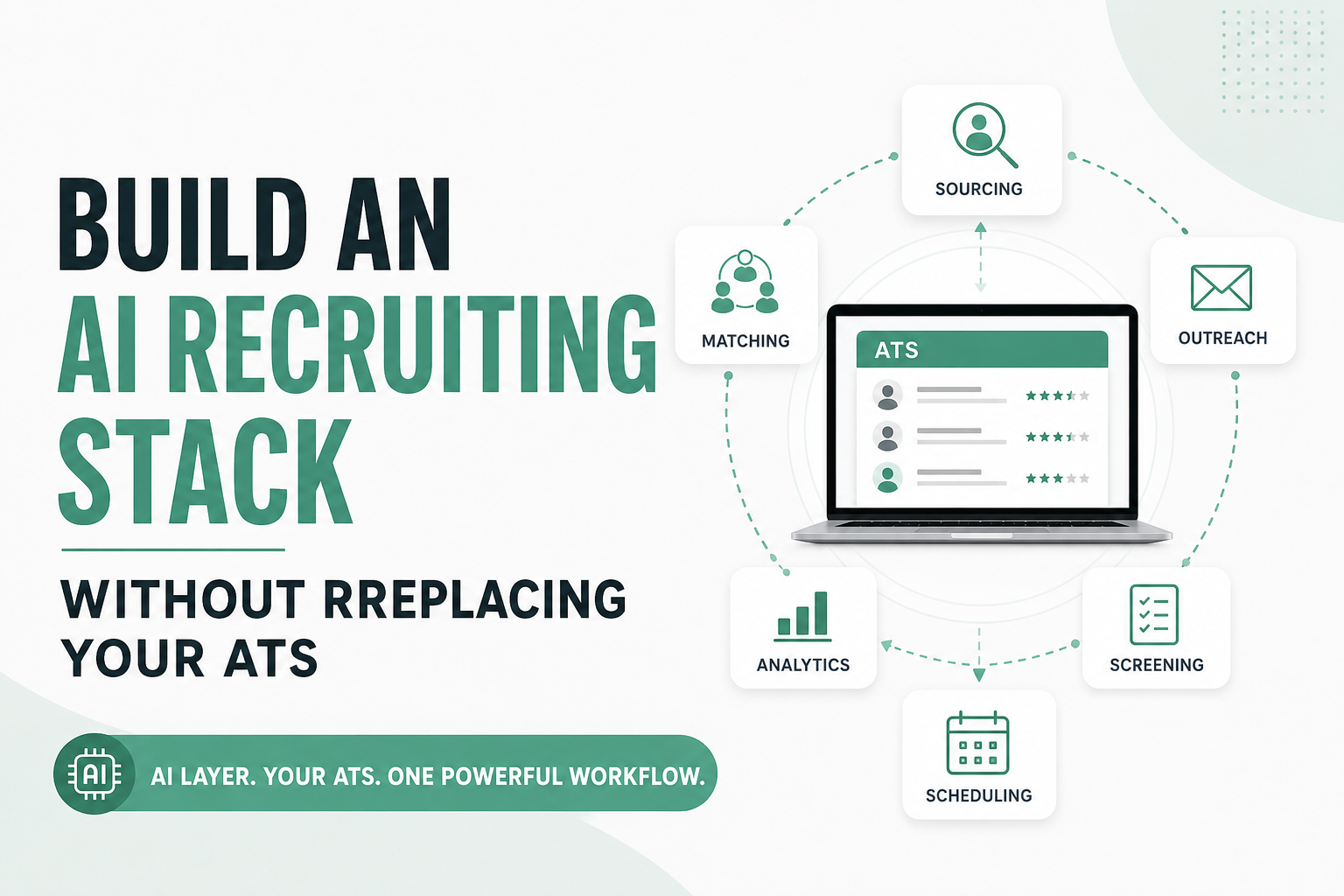
An AI recruiting stack is a set of AI-powered tools — for sourcing, matching, screening, outreach, and scheduling — layered around a recruiting team's existing systems, most often the ATS or CRM that already serves as the system of record. It automates the repetitive, high-volume parts of recruiting while keeping candidate and job data centralized in one place.
The important shift is architectural, not just technological. A traditional recruiting workflow runs ATS → recruiter → manual tools, where every additional tool means another manual step for the recruiter to manage. An AI-augmented workflow runs ATS ↔ AI layer ↔ recruiting workflows, where the AI layer reads from and writes back to the ATS directly, and the recruiter reviews outcomes rather than performing every step by hand.
An AI recruiting stack is not a single all-in-one platform, and it's not a pile of disconnected point tools either. It's a defined set of AI capabilities with a clear relationship to one system of record — which is exactly what separates a stack that compounds in value from one that just adds more logins to check.
Do You Need to Replace Your ATS to Add AI?
Usually, no. Most recruiting teams can add meaningful AI capability — sourcing, matching, screening, outreach — on top of an existing ATS through integrations, without a platform migration. Replacement becomes the right call only when the ATS itself, not the absence of AI, is the actual constraint.
Keeping your ATS generally makes sense when it already handles the core job reasonably well: candidate and job order data is accessible, recruiters are comfortable in it, historical candidate relationships are intact, and the main friction is around specific tasks — sourcing volume, screening time, follow-up consistency — rather than the platform itself. Migrating a working ATS to chase an AI feature usually costs more in disruption than it delivers in value, especially given how much institutional knowledge lives in candidate notes and pipeline history that doesn't always transfer cleanly.
Replacement is worth considering when the ATS is the actual bottleneck: workflows that can't be configured to match how your team operates, integration capabilities that are genuinely inadequate (no API, no supported connectors, exports only), data that recruiters can't reliably access or trust, a system recruiters actively avoid, or maintenance and licensing costs that have become disproportionate to the value delivered. If your organization already has a migration underway for reasons unrelated to AI, that's a different conversation — but AI alone is rarely a strong enough reason on its own.
The core principle worth holding onto: don't replace an ATS simply because you want AI. Evaluate the ATS on its own merits first.
The AI Recruiting Stack Blueprint
Here's how the pieces fit together when they're built correctly — as layers around one system of record, not as parallel systems competing for the same data.
↓
AI Sourcing → AI Matching & Screening → AI Outreach → Scheduling
↓
Recruiter Review
↓
Results → ATS
↓
Analytics → ROI
Layer 1: ATS / System of Record
Candidates, jobs and requisitions, pipeline stages, recruiter activity, client information, submissions, notes, and historical data all live here. Every other layer reads from and writes back to this one system — it doesn't get replicated elsewhere.
Layer 2: AI Sourcing
Finds candidates beyond a keyword search — passive candidates, new profiles matching a role's requirements, and talent that wouldn't surface through the existing database alone. Sourced candidates should land in the ATS pipeline, not a separate list a recruiter has to check independently.
Layer 3: AI Matching and Screening
Matches candidates to job requirements, analyzes resumes, ranks candidates, and flags qualification gaps before a recruiter spends time on manual review. This is where AI resume parsing typically sits — reducing the volume of resumes a recruiter has to read in full without removing the recruiter's final judgment.
Layer 4: AI Outreach
Handles personalized first-touch messaging, follow-up sequences, and response handling, so candidates get consistent engagement without a recruiter manually tracking who needs a second or third message.
Layer 5: Scheduling and Coordination
Self-scheduling, reminders, and rescheduling logic that removes the back-and-forth of finding interview times across candidates, hiring managers, and recruiters juggling multiple open roles.
Layer 6: Recruiter Intelligence / Copilot
Captures recruiter notes, call summaries, interview feedback, and suggested next actions — reducing the time recruiters spend on documentation instead of candidate conversations.
Layer 7: Analytics
Reports on sourcing efficiency, response rate, screening time, time-to-submit, interview conversion, placement conversion, and how each AI-assisted step is actually performing.
Layer 8: ATS Feedback Loop
The loop that makes the whole stack work: ATS → AI → Action → Candidate → Outcome → ATS → Analytics. Every AI-driven action produces an outcome that flows back into the ATS, which is what keeps the system of record accurate and keeps analytics meaningful. Without this loop, AI activity happens in a vacuum the ATS never sees — which is functionally the same problem as a spreadsheet nobody updates.
How AI-Ready Is Your Recruiting Stack?
Ninjahire AI Recruiting Stack Self-Assessment — this is a practical self-assessment, not an industry benchmark. Answer each question, then see where your stack stands.
What Should an AI Recruiting Stack Automate First?
Trying to automate everything in the first pass is one of the most common ways an AI rollout stalls. It's better to start with the tasks that are genuinely low-risk to automate and expand from there.
The candidates for early automation share a set of traits: they're high volume, repetitive, time-consuming, standardized across most job orders, and relatively low risk if the AI gets something slightly wrong on a given run. Candidate sourcing, initial matching, first-touch outreach, and follow-up messaging fit that description well. Resume screening and interview scheduling usually come next, once the earlier steps are producing clean data. Recruiter note capture and candidate status updates are good later additions, since they touch recruiter workflow habits that take longer to shift.
Judgment-heavy decisions — who actually gets submitted to a client, how an offer gets negotiated, how to read a reference check — should keep strong human involvement regardless of how mature the rest of the stack becomes. The risk with those steps isn't inefficiency. It's getting the decision wrong in a way that damages a client relationship or a candidate's experience.
How AI Should Connect to Your ATS
The integration method matters as much as the AI tool itself. Four models are common, and none of them is universally the right answer.
Native integration
The strongest option when it exists: the AI vendor and the ATS have a pre-built, supported connection. Lower maintenance burden, but you're limited to what the vendor has chosen to build.
API / webhook
Best for deeper or more customized workflows, particularly where the standard native integration doesn't cover a field or trigger your team actually needs. Requires more technical resources to set up and maintain.
iPaaS / automation layer
Middleware (think Zapier-style platforms or dedicated integration platforms) that connects systems without either vendor building a direct integration. Useful when you need to connect several tools and don't want to manage each connection individually, though it adds another layer that can fail.
Browser or extension layer
Lightweight and useful for testing a workflow or covering a narrow use case, but generally not durable enough for a core, high-volume process.
None of these is inherently superior. The right choice depends on what your ATS supports, how customized your workflow needs to be, and how much integration maintenance your team can realistically own.
What Data Should Flow Between AI and Your ATS?
The exact fields available, and whether sync runs one-way or two-way, depends on your specific ATS, the integration method, and the vendor's implementation — not every ATS supports every field below equally.
| Data type | Typical direction | Why it matters |
|---|---|---|
| Candidate profile | AI → ATS | Prevents duplicate records across sourcing tools |
| Job requirements | ATS → AI | Powers accurate matching and screening |
| Candidate match / score | AI → ATS | Keeps ranking visible where recruiters actually work |
| Screening result | AI → ATS | Avoids a recruiter checking a separate dashboard |
| Outreach activity | AI → ATS | Full engagement history in one candidate record |
| Response status | AI → ATS | Tells recruiters who to prioritize next |
| Recruiter notes | ATS ↔ AI | Context that improves future matching and outreach |
| Candidate stage | ATS ↔ AI | Keeps automation aligned with pipeline reality |
| Source attribution | AI → ATS | Preserves reporting on what's actually working |
| Interview information | AI → ATS | Keeps scheduling data with the rest of the record |
| Disposition | ATS ↔ AI | Closes the loop so AI tools don't re-contact closed candidates |
7 Questions to Ask Before Adding an AI Recruiting Tool
- What does the integration actually sync? Vendors often say "integrates with your ATS" without specifying which fields. Get the exact list before signing anything.
- Is the sync real-time or scheduled? A batch sync running once a day means recruiters could be working from stale candidate status for hours.
- How are duplicate candidates handled? Without clear matching logic, an AI sourcing tool will create a new record for a candidate who's already in your database.
- Does source attribution remain intact? If the integration overwrites source data, you lose the ability to know which channels are actually producing placements.
- What happens when data conflicts? If a recruiter updates a stage in the ATS while the AI tool is mid-sequence, you need to know which system wins.
- Can the integration handle custom ATS fields? Most staffing ATS platforms have agency-specific fields. A rigid integration that only maps standard fields will lose data.
- Can recruiters continue working primarily inside the ATS? If a tool forces recruiters to live in a second interface for their daily work, adoption tends to drop regardless of how capable the tool is.
How to Avoid Creating Another Recruiting Data Silo
The most common failure pattern looks like this: a candidate record exists in the ATS. The same candidate gets a second record in a new AI platform. A recruiter exports something to a spreadsheet for a specific client request, creating a third version. An outreach tool logs replies in its own inbox, creating a fourth. None of these four records agree with each other, and nobody is quite sure which one is current.
The principle that prevents this: one system of record, multiple specialized execution layers. The ATS stays the source of truth for candidate and job data. AI tools are execution layers that read from it and write results back to it — they don't maintain their own competing version of the candidate. Getting this right requires being deliberate about data ownership before signing a new tool, not fixing it after six months of accumulated duplicate records.
How to Measure an AI Recruiting Stack
The right metric depends on which part of the workflow you're trying to improve. A useful way to organize measurement is across six categories.
| Category | Metrics to track |
|---|---|
| Efficiency | Recruiter hours saved, sourcing time, screening time, administrative time |
| Pipeline | Candidates sourced, qualified candidates, response rate, screening-to-submission rate |
| Speed | Time-to-source, time-to-screen, time-to-submit, time-to-fill |
| Quality | Qualified candidate rate, interview conversion, submission-to-placement, client acceptance |
| Technology | Integration success rate, duplicate rate, data completeness, recruiter adoption |
| Financial | Cost per qualified candidate, cost per placement, recruiter capacity, revenue per recruiter |
How to Calculate AI Recruiting ROI
Value created can come from several sources: recruiter time recovered, additional placements made possible by that recovered capacity, reduced administrative work, increased recruiter throughput, and improved candidate response and conversion rates.
The nuance that's easy to miss: time saved is not automatically financial value. If AI sourcing saves a recruiter eight hours a week and those hours aren't redirected toward billable activity — more submissions, more client conversations, more placements — the time savings exist on paper but never show up in revenue. Time only becomes economic value when the recovered capacity gets used productively. That's worth stating plainly before anyone builds a business case around hours saved alone.
AI Recruiting Stack for Staffing Agencies
Staffing agencies have a version of this problem that's more acute than in-house corporate recruiting. A staffing recruiter is running multiple client job orders at once, each with different requirements, working against a shared candidate database, re-engaging past candidates for new roles, and being measured on time-to-submit as much as time-to-hire. Every disconnected tool multiplies that complexity across every open desk.
↓
AI Sourcing → AI Matching → AI Outreach → AI Screening
↓
Recruiter Review
↓
Submission → ATS Update → Analytics
This workflow matters specifically for staffing because the ATS/CRM is doing double duty — holding both the candidate pipeline and the client relationship — and because submission speed is a competitive factor with clients, not just an internal efficiency metric. AI sourcing and matching help agencies fill high-volume requisitions without proportionally growing headcount, but only if the results land back in the ATS where recruiters and client-facing staff can actually see them.
When Should You Replace Your ATS Instead?
Replacement is the right call in a narrower set of situations than most vendors imply. Consider it when the ATS fundamentally limits how your team can configure workflows, when its integration capabilities are genuinely inadequate rather than just unused, when data can't be reliably accessed or exported, when recruiters actively avoid the system because it slows them down, when your organization already has a migration planned for other reasons, when maintenance or licensing costs have become disproportionate, or when compliance and workflow requirements your business actually needs simply aren't available in the platform.
Don't replace an ATS just because you want AI — but don't stay on a system that's genuinely the bottleneck out of migration fatigue, either. If you're weighing this decision directly, it's worth reading through how AI recruitment platforms compare to traditional ATS software before deciding which category actually fits your situation.
Build vs Buy vs Integrate
| Approach | Best when | Main risk |
|---|---|---|
| Build | Unique workflow and available technical resources | Ongoing maintenance burden |
| Buy | Standard, well-understood use case | Vendor fit and lock-in |
| Integrate | Existing stack is already strong | Integration complexity |
| Replace ATS | Existing ATS is the actual bottleneck | Migration disruption |
For most organizations, the lowest-risk starting point is the smallest integration that solves one measurable problem — not a full-stack overhaul. Prove adoption and results on that one workflow, then expand from a position of evidence rather than assumption.
30-Day AI Recruiting Stack Implementation Plan
Week 1: Audit
Map the current workflow, identify the biggest manual bottleneck, confirm what your ATS's integration capabilities actually support, and establish baseline metrics before changing anything.
Week 2: Pilot
Choose one workflow to automate — a common starting point is AI sourcing → qualification → ATS entry. Resist the urge to automate the entire recruiting process at once.
Week 3: Validate
Measure adoption, data accuracy, duplicate rate, recruiter time saved, and candidate quality on the pilot workflow specifically.
Week 4: Expand
If the results hold up, extend into outreach, screening, and scheduling, and connect the analytics layer so performance across the stack is visible in one place.
Original Frameworks
Three frameworks from this guide are worth keeping as reference points when evaluating tools or reporting internally.
AI Recruiting Stack Architecture
System of Record → Intelligence → Execution → Human Review → System of Record. The ATS anchors the process at both ends. AI provides intelligence (matching, ranking) and execution (outreach, scheduling), a recruiter reviews before anything consequential happens, and results return to the system of record — closing the loop rather than leaving it open.
AI Integration Depth Score (0–5)
A practical way to evaluate how deep a given AI tool's ATS integration actually goes — not an industry-standard benchmark, just a useful lens for comparing vendors.
- 0 — No integration: the tool operates entirely on its own
- 1 — Export/import: manual file transfer between systems
- 2 — One-way sync: data flows in one direction only
- 3 — Basic two-way sync: core fields update in both directions
- 4 — Workflow/event integration: actions in one system trigger events in the other
- 5 — Deep bidirectional workflow integration: near real-time sync across most relevant fields and triggers
AI Automation Priority Matrix
Evaluate candidate tasks for automation using Volume × Repetition × Time Cost × Standardization × Risk. Tasks that score high on volume, repetition, time cost, and standardization — and low on risk — are the strongest early candidates. Tasks that are low volume, non-standard, or carry high consequence if the AI gets it wrong should stay closer to fully manual, or receive heavier human review.
Frequently Asked Questions
What is an AI recruiting stack?
An AI recruiting stack is a set of AI tools for sourcing, matching, screening, outreach, and scheduling layered around a recruiting team's existing system of record, typically an ATS or CRM.
Do AI recruiting tools replace an ATS?
Not usually. Most AI recruiting tools are designed to integrate with an ATS rather than replace it, handling specific execution tasks while the ATS remains the system of record.
How do you build an AI recruiting stack?
Start by auditing your current workflow to find the biggest bottleneck, pilot one AI capability against that specific problem, validate the results, then expand into additional layers once adoption and data quality hold up.
How do AI recruiting tools integrate with an ATS?
Through native integrations, API/webhook connections, iPaaS or automation-layer middleware, or lightweight browser-extension tools — the right method depends on your ATS's capabilities and how customized the workflow needs to be.
What should an AI recruiting stack include?
At minimum, an ATS as the system of record plus AI capability for sourcing and matching. Most teams add outreach, screening, and scheduling as the stack matures, with analytics tying performance together.
Can you add AI to an existing ATS?
Yes, in most cases, through the integration models described above. The exceptions are ATS platforms with genuinely limited integration capability or inaccessible data.
What is the best AI recruiting stack for staffing agencies?
There's no single best stack — it depends on client mix, volume, and specialization. But for most staffing agencies, the strongest starting point pairs a solid ATS/CRM with AI sourcing, matching, and outreach that write results directly back into the pipeline recruiters already use.
What data should AI recruiting tools send to an ATS?
Candidate profiles, match scores, screening results, outreach and response activity, source attribution, and disposition — though exact fields depend on the ATS and integration method.
How do you measure AI recruiting ROI?
Using (Value Created − Technology Cost) ÷ Technology Cost × 100, where value created includes recovered recruiter time, additional placements, and reduced administrative work — with the caveat that time saved only becomes financial value once it's redirected to productive work.
Should you replace your ATS or integrate AI with it?
Integrate, in most cases. Replace only if the ATS itself — not the absence of AI — is genuinely limiting your workflow, integrations, data access, or compliance requirements.
What should you automate first in recruiting?
Tasks that are high-volume, repetitive, time-consuming, and standardized — typically sourcing, initial matching, and first-touch outreach — while keeping judgment-heavy decisions with recruiters.
Where This Leaves Your Stack
If your ATS already works as your system of record but recruiters still spend too much time sourcing, reaching out to candidates, or screening profiles by hand, the next step probably isn't another core system. It's an AI execution layer that works with the workflow you already have — one that reads from your ATS, does the repetitive work, and writes results back where recruiters can actually use them.
Ninjahire is built around that model: AI sourcing, matching, and outreach designed to sit on top of the ATS your team already uses, rather than asking recruiters to adopt a second system. If it's worth comparing against how you're weighing an ATS versus a CRM in your current setup, this breakdown of recruiting CRM vs ATS is a useful place to start.
Try Ninjahire — see how it fits into the recruiting workflow you're already running.